Comparison
Forward Motion vs. Drive + email + spreadsheets
Let's be honest about the real competition: it isn't another app. Most volunteer boards run on a shared Google Drive, an email thread, and a spreadsheet — and that setup is free. This page takes it seriously, because it can genuinely work. The question is what it costs when it doesn't.
Where the free setup shines
Everyone already knows the tools. There's nothing to buy, nothing to approve, nothing to learn. For a small board with a genuinely organized secretary — the kind of person who files the minutes the same night and actually maintains the spreadsheet — Drive and email can carry a board for years. If that's your board, and that person isn't going anywhere, you may not need us yet. We'd rather tell you that than sell you something.
Where it quietly breaks
Not in the meeting — between meetings. The obligations with no calendar: the conflict-of-interest forms nobody chased, the audit deadline that surfaced as an emergency. The action items that passed with enthusiasm and died in a spreadsheet nobody reopened. The new trustee who onboarded by sitting quietly for six months. And the failure mode nobody plans for: the whole system living in one volunteer's head, working right up until that volunteer's term ends. None of these are character flaws. They're what happens when follow-through depends on remembering.
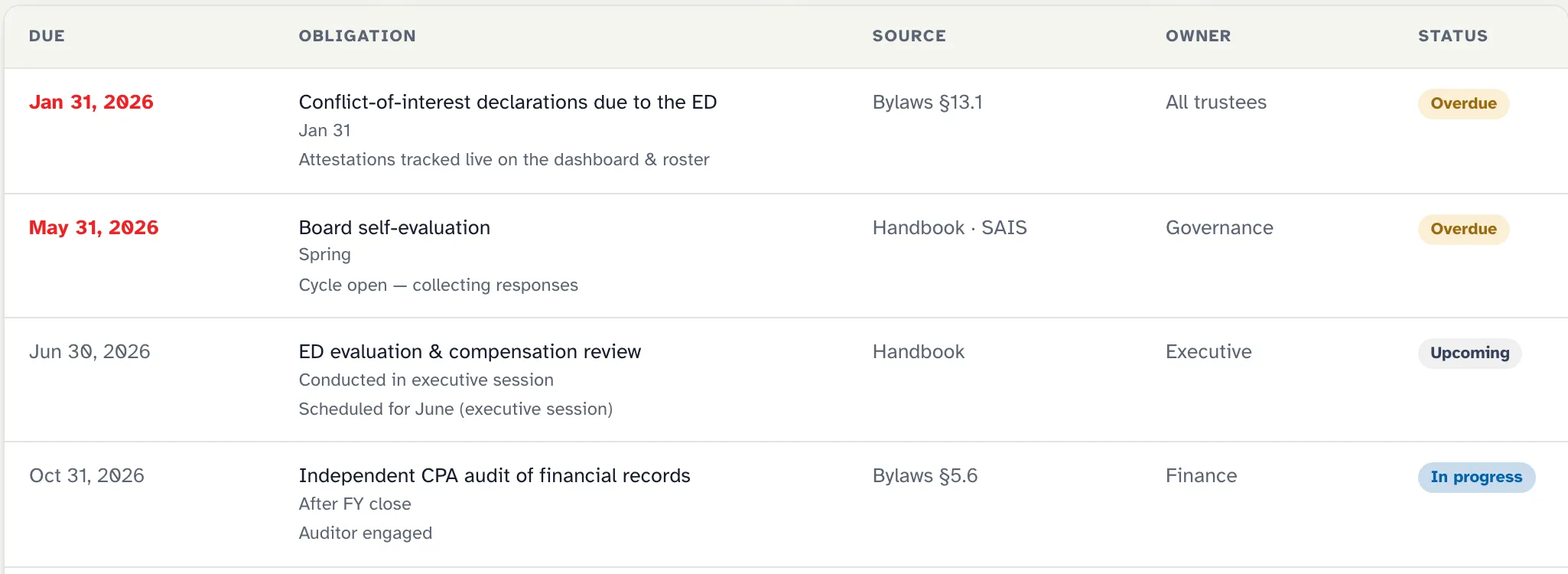
What you're maintaining by hand
| Forward Motion | Drive + email + spreadsheets | |
|---|---|---|
| Meeting scheduling & RSVPs | Built in, with reminders | Email threads + calendar invites |
| Quorum | A live meter, from your bylaws' own fraction | A head count in the room |
| Motions & minutes | Structured record — immutable once approved | Docs in Drive, if someone files them |
| Action items | One shared tracker, owners and due dates, automatic reminders | A spreadsheet somebody has to remember to update |
| COI attestations | Click-to-sign, tracked, recusals pre-flagged | Paper forms chased by email |
| Compliance deadlines | A calendar that reminds the right people | Someone's memory |
| New-trustee onboarding | A checklist generated for each new member | By osmosis |
| Documents | Your Drive, linked and organized — keep it | Your Drive |
| Institutional memory | The record — searchable, exportable, attached to the board | The former secretary's inbox |
| Cost | $149/mo billed annually + $1,000 onboarding | Free — plus the volunteer hours that hold it together |
One thing that doesn't change: your documents stay in your Drive either way. Forward Motion links to them — it never takes them. We try to keep this page fair; if we've been unfair to your spreadsheet, email team@keepforwardmotion.com and make the case.
Which one fits your board?
Stay with Drive + email if…
- Your board is small, meets rarely, and has light fiduciary obligations.
- You have that rare, organized volunteer — and a plan for when they roll off.
- Honestly: if the current system isn't dropping anything, don't buy software to fix a problem you don't have.
Choose Forward Motion if…
- Things are slipping — deadlines surfacing late, action items evaporating, minutes scattered.
- Institutional memory currently lives in one person's inbox.
- You want the follow-through to be automatic, so volunteer energy goes to the mission instead of the mechanics.
Let’s get your board moving.
A 30-minute call: you bring your bylaws and how your board works today; I’ll show you the app and answer everything. No pitch deck, no pressure.
Prefer email? team@keepforwardmotion.com